Loading... Please wait...


Categories
For Epson Photo 2200
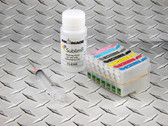
The Sublim8 cleaning kit for the Epson Photo 2200 consists of a full set of 7 x refillable cartridges, a bulk bottle of Sublim8 cleaning fluid, a filling syringe, and full instructions. The cartridges contained in these kits are fitted with auto reset ink monitor chips and can be used many times for cleaner a printer – just buy more Sublim8 cleaner as and when needed. The process for use is pretty simple:-
- Fill the refillable cartridges with Sublim8 cleaner and install in the printer.
- Run four head cleanings in a row and then a nozzle check print to check if any color remains in the printer. Run additional cleaning cycles and nozzle check prints until the output is clear.
- Let the printer stand for a few hours or preferably overnight to allow the cleaning fluid to dissolve any dried ink.
- Remove the cleaning cartridges and re-install ink cartridges.
- Run a nozzle check print and head cleaning cycles as necessary until you get a good nozzle check print.
These steps are explained in more detail in our printer cleaning guides on our Sublimation support pages.